NEW RELEASE · EXPERIMENTALLooking for ChromaMatter 0.9?

Snapmaker Orca with CM

Color. Shade. Make it yours.

Bring CMY color, hands-on painting, shell-thickness gradients and guided contour splitting into your Orca workflow. The dedicated color editor comes bundled.
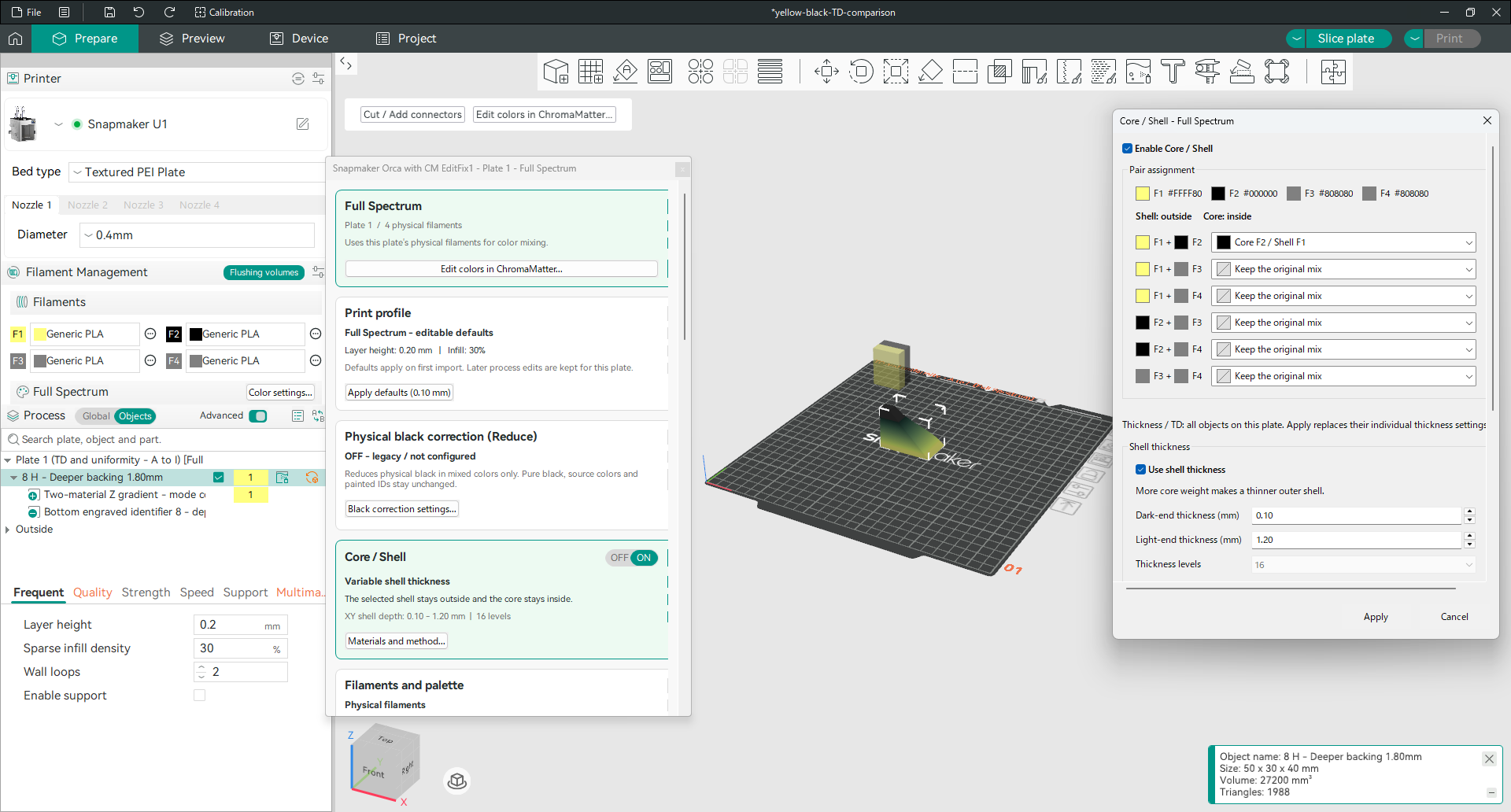
Snapmaker Orca with CM running, with the Full Spectrum panel, model on a build plate and Core/Shell settings open
Orca with CM · Development viewFull Spectrum・Core/Shellの開発画面

Choose your OS. Download the app.

These are ready-to-run app packages. No source-code download needed.

Experimental software: unexpected behavior is possible, and the UI is a work in progress.
Keep your original files, save a separate copy, and check the sliced result before printing. This is an unofficial Snapmaker Orca modification.

More ways to shape your colors

  • Full Spectrum・CMY・Flat FourChoose Full Spectrum, CMY or Flat Four to suit your model.
  • Core/Shell gradientsExplore shell-thickness gradients, material TD inputs and virtual CMY-black or white cores.
  • Hands-on color editingRefine colors with a brush, fill and eyedropper, then send the changes back to Orca. Drag with the mouse wheel pressed to pan, right-drag to rotate, and scroll to zoom.
  • Color, shading & materialsAdjust color and lighting, manage material settings and reduce physical black in mixed colors.
  • Guided contour splittingEnglish/Japanese guidance, rectangular region selection and adjustable cutting-line height.
  • 4–8 base-color candidatesChoose how many base colors to consider. More than four are planning candidates, not extra printer tools.
Setup notes & supported systems

No separate ChromaMatter or Python installation is needed. Keep your existing Snapmaker Orca installation and try this build in a separate folder.

  • Windows is unsigned and shares settings with earlier TD trial builds. Close those apps and back up their settings first. Mac has no Developer ID signature or notarization. Your OS may warn or block the first launch.
  • Mac requires Apple Silicon and macOS 15 or later; Intel Macs are not supported. Build, packaging and command-line checks passed; Mac GUI and real-device operation are unverified.
  • Linux needs GTK3, WebKitGTK, GStreamer and an English locale. See the setup instructions on GitHub. Real-GPU use and other distributions are unverified.
  • Snapmaker U1 printing still requires four physical filaments. Automatic per-part four-color selection and print grouping are not implemented.
  • Contour splitting targets a closed, tube-like region in a single-volume, single-instance object. Complex branches and some paint data are unsupported.
  • TD and Core/Shell are experimental, not optically calibrated. New project settings may not reopen in older trials. Save a separate copy; real-model workflows, printing and color accuracy are not guaranteed.
CHROMAMATTER 0.9 · OFFICIAL DOWNLOADS

ChromaMatter 0.9 — Downloads

Improved model repair and 3MF export, adjustable export validation, and output controls beside the Export 3MF button. Full Spectrum and Flat Four are both included.

0.9は修復・3MF出力を改善。出力判定の段階設定と、3MFボタン横にまとめた出力操作を追加しました。Full Spectrum/Flat Fourの両方を使えます。
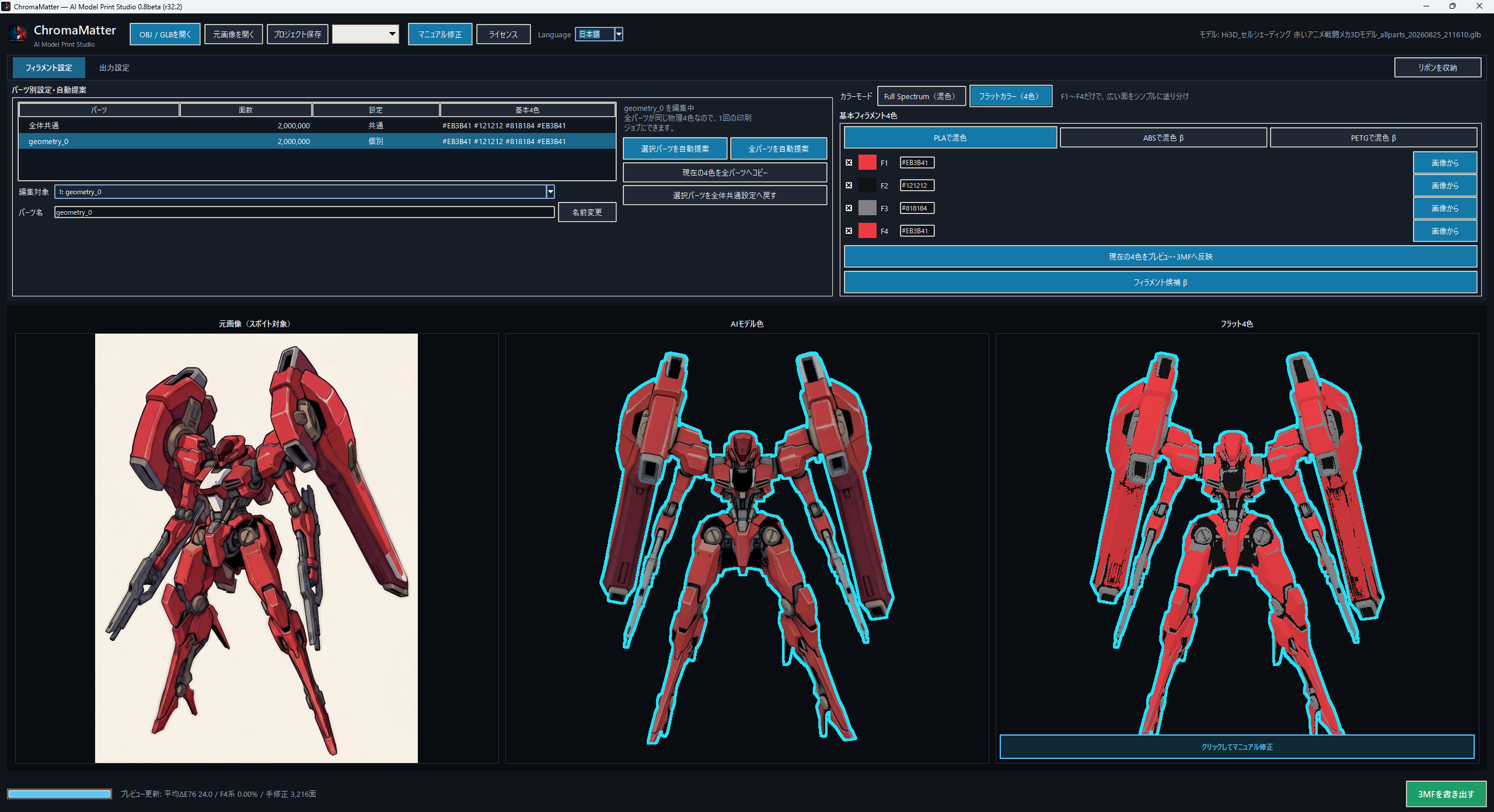
ChromaMatter running with a robot model, physical filament palette and colour-mapped preview
ChromaMatter · Colour preparation & 3MF export配色の調整・3MF出力
WINDOWS

Windows 64-bit

0.9 · Standalone ZIP

  • Extract the entire ZIP, then open ChromaMatter.exe
  • No Python installation or first-launch dependency download
  • Unsigned; Windows may show a SmartScreen warning
  • App only — development sources are a separate, optional download
Download for Windows110 MB
SHA-256947116390BF3C71158B313EDD213043C42A7C11E84E178764BCD5EF23D3D7329
macOS

Apple Silicon

0.9 · Native .app · Technical alpha

  • Apple Silicon (M-series), macOS 15 or later; not Intel Mac
  • Extract the ZIP, move ChromaMatter-macOS-Alpha.app to Applications, then open it
  • Python and native dependencies are bundled
  • No Developer ID signature or notarization; macOS may block the first launch
  • Built and smoke-tested on a hosted Apple Silicon Mac; physical-device coverage is limited
Download for macOS80 MB
SHA-256B74B5032C23AD2119E95FFF5159FFCC11828DFA0FE25D2A17BE2662BFC79A9AC
LINUX

Linux x86_64

0.9 · Ubuntu 22.04 · Technical alpha

  • Extract the tar.xz and follow the included launcher instructions
  • Python and native dependencies are bundled; no first-launch Python setup
  • Verified on this PC with WSL2 + Ubuntu 22.04, including Japanese and English UI
  • Desktop/display libraries and suitable Japanese fonts are host requirements
  • Unsigned; native Linux desktops, GPUs, and other distributions are not all verified
Download for Linux118 MB
SHA-2566734DECA57C0F1AD456737171CEFE8F9376BBBB99AAA21214BE10DF49638B327

Shared DemoData — optional

DemoData is a separate download, not bundled with the 0.9 apps. Use the same GLB and reference image with any platform.

Download DemoData115 MB
SHA-2561EA9A7630CE098ECD76E2E1182F2F3129BB05B1AE00BCDFF5DDED2767C9BFF66
Developer downloads — optional source & licences / 開発者向け

You do not need these large files to run the apps. All three app downloads above contain the runtime and licence notices; their development sources and rebuild/replacement material are provided separately here. Some native rebuild/replacement procedures remain unverified, as recorded in the source notes.

通常の利用には不要です。上の3つがアプリ本体です。開発用ソース・再構築/差替え資料は別配布にしています。一部ライブラリの再構築・差替え手順は未検証で、詳細はソース付属資料に記録しています。

Windows corresponding source1303 MB
SHA-2561FB967494113DEF72B37D7C820A66F3E865A58BB0DDBB844CEB07DC7465B46C6
macOS corresponding source2011 MB
SHA-256B68BBECF1D36B8A3EAA0FB7F88788D0FE66541667D1F27648D9774270D2D7157
Linux corresponding source2238 MB
SHA-256ED69F16F8215D70C1372EAB51E57CC5967BF0E7CE97B92E914797D3F617E16CD
i

Large files open a dedicated download page. Keep it open until the download finishes. Report a problem / 不具合報告